Power BI Embedded Pricing Explained for Growing Businesses
Microsoft Power BI has become one of the world's most popular business intelligence platforms. Companies use it to create interactive dashboards, visualize data, and make informed decisions. However, when organizations want to securely share dashboards with customers, partners, or external stakeholders, they often discover that Power BI licensing can become expensive and difficult to manage.
This is where Power BI Embedded becomes an attractive solution.
But how much does Power BI Embedded really cost? Is it cheaper than purchasing hundreds of Power BI Pro licenses? Which pricing model is right for your business?
In this guide, we'll explain everything you need to know about Power BI Embedded pricing, how Microsoft calculates costs, and how platforms like InsightsPulse help businesses deliver secure analytics while significantly reducing licensing expenses.
Understanding Power BI Licensing
Before discussing Power BI Embedded pricing, it's important to understand Microsoft's licensing ecosystem.
Power BI offers multiple licensing options, including:
- Power BI Free
- Power BI Pro
- Power BI Premium Per User (PPU)
- Power BI Premium Capacity
- Power BI Embedded
Each option serves different business requirements. Organizations that only need internal reporting often choose Pro or Premium licenses, while companies that need to provide dashboards to customers usually benefit from Power BI Embedded.
Choosing the right licensing model directly affects operational costs and scalability.
What Is Power BI Embedded?
Power BI Embedded is Microsoft's Azure-based service that allows businesses to embed Power BI dashboards into websites, portals, SaaS products, CRMs, ERPs, or customer applications.
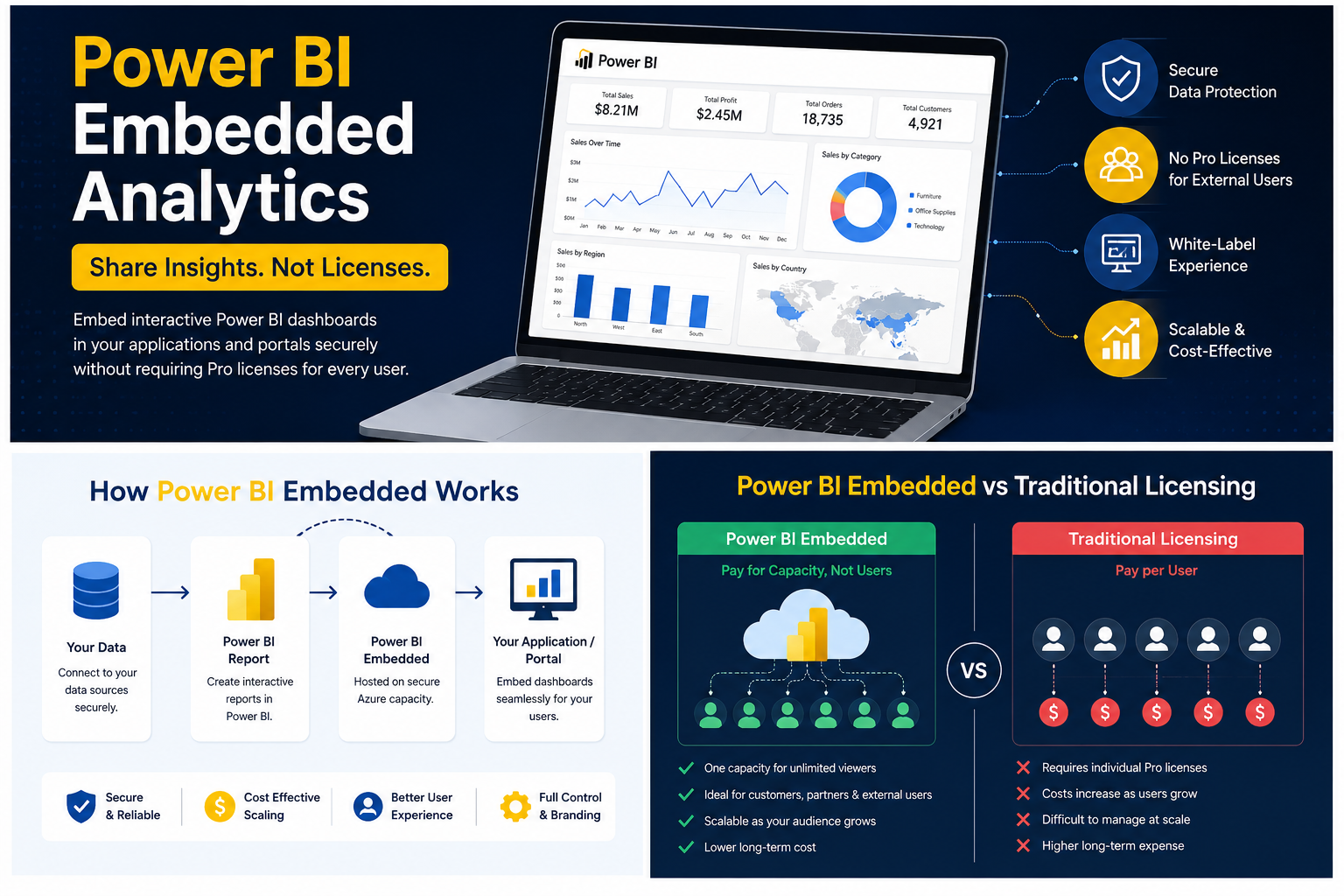
Instead of requiring every external user to purchase a Power BI license, organizations pay for dedicated Azure capacity and securely share reports through their own applications.
This approach is especially valuable for:
- SaaS companies
- Analytics platforms
- Customer portals
- Partner dashboards
- White-label reporting solutions
- Enterprise applications
Power BI Embedded provides a seamless user experience while giving businesses greater control over branding, authentication, and access management.
How Power BI Embedded Pricing Works
Unlike traditional Power BI licensing, Embedded pricing is based on Azure capacity, not the number of viewers.
Microsoft provides different Embedded SKUs (A1, A2, A3, and higher), each offering varying levels of computing resources.
Pricing depends on factors such as:
- Processing power
- Memory allocation
- Concurrent report usage
- Rendering requirements
- Geographic Azure region
- Operating hours
This usage-based model allows organizations to scale resources as demand grows instead of paying for individual user licenses.
Why Traditional Licensing Becomes Expensive
Many businesses initially purchase Power BI Pro licenses because they appear affordable.
However, costs increase rapidly when:
- Customer numbers grow
- External users require dashboard access
- Agencies manage multiple clients
- Organizations need secure report sharing
- Vendors provide analytics to customers
For example, if hundreds of clients require dashboard access, purchasing individual licenses for every user can become significantly more expensive than deploying Power BI Embedded.
Growing companies should evaluate licensing costs before expanding customer-facing analytics.
Who Should Use Power BI Embedded?
Power BI Embedded is particularly valuable for organizations that need to share analytics outside their internal workforce.
Ideal use cases include:
SaaS Companies
Embed dashboards directly into software products without requiring customers to log into Microsoft Power BI.
Marketing Agencies
Provide branded analytics portals to multiple clients from a single platform.
ERP Providers
Integrate reporting directly into ERP applications.
CRM Platforms
Deliver customer insights without redirecting users to separate reporting tools.
Enterprises
Share executive dashboards securely with partners and suppliers.
Advantages of Power BI Embedded
Lower Cost at Scale
Instead of purchasing hundreds of individual licenses, organizations pay for dedicated capacity that supports multiple users.
Better User Experience
Customers access dashboards directly from your website or application.
There is no need for Microsoft accounts or separate Power BI logins.
White Label Branding
Organizations can remove Microsoft branding and present dashboards under their own company identity.
This improves professionalism and customer trust.
Secure Authentication
Businesses control authentication using their existing login systems while maintaining enterprise-grade security.
Flexible Scaling
Azure capacity can be increased as user demand grows, making Embedded suitable for expanding businesses.
Hidden Costs Businesses Often Overlook
While Power BI Embedded reduces licensing expenses, organizations should also consider implementation costs.
These may include:
- Azure resource management
- Application development
- Authentication integration
- User management
- Infrastructure monitoring
- Maintenance
- Security updates
Without the right implementation strategy, deployment complexity can offset some of the financial benefits.
How InsightsPulse Helps Reduce Power BI Costs
Many businesses want the advantages of Power BI Embedded without the complexity of building their own infrastructure.
InsightsPulse simplifies the process by providing a secure analytics portal that enables organizations to:
- Share Power BI dashboards securely
- Eliminate the need for individual customer licenses
- Deliver white-label reporting experiences
- Manage user permissions from one platform
- Embed dashboards into existing websites
- Reduce implementation time
- Lower ongoing operational costs
Instead of investing months in custom development, businesses can deploy a ready-to-use analytics portal designed specifically for secure dashboard sharing.
Power BI Embedded vs Power BI Pro
Feature | Power BI Pro | Power BI Embedded |
|---|---|---|
External Sharing | Limited | Excellent |
Customer Portals | No | Yes |
White Label | No | Yes |
Microsoft Login Required | Usually Yes | No |
Large External Audience | Expensive | Cost Effective |
SaaS Integration | Limited | Excellent |
For businesses serving external customers, Embedded typically provides greater flexibility and better long-term value.
Best Practices for Controlling Embedded Costs
To maximize return on investment:
- Choose the appropriate Azure capacity.
- Monitor report usage regularly.
- Optimize dashboard performance.
- Remove unused reports.
- Use row-level security effectively.
- Schedule capacity based on business hours where appropriate.
- Compress datasets to reduce resource consumption.
- Review licensing requirements periodically as your user base grows.
A proactive approach helps ensure that analytics remain cost-efficient while delivering excellent performance.
Conclusion
Power BI Embedded offers growing businesses a scalable way to deliver secure, customer-facing analytics without the burden of purchasing individual licenses for every external user. While Microsoft's pricing model is based on Azure capacity rather than per-user licensing, understanding your usage patterns and implementation requirements is essential for controlling costs.
If you're looking to provide branded dashboards, streamline report sharing, and reduce licensing expenses, InsightsPulse delivers a ready-to-use white-label analytics portal that simplifies deployment while helping you get the most value from Power BI Embedded.
Ready to modernize your analytics sharing? Explore how InsightsPulse can help you securely embed Power BI dashboards, lower licensing costs, and deliver a seamless reporting experience for your customers.