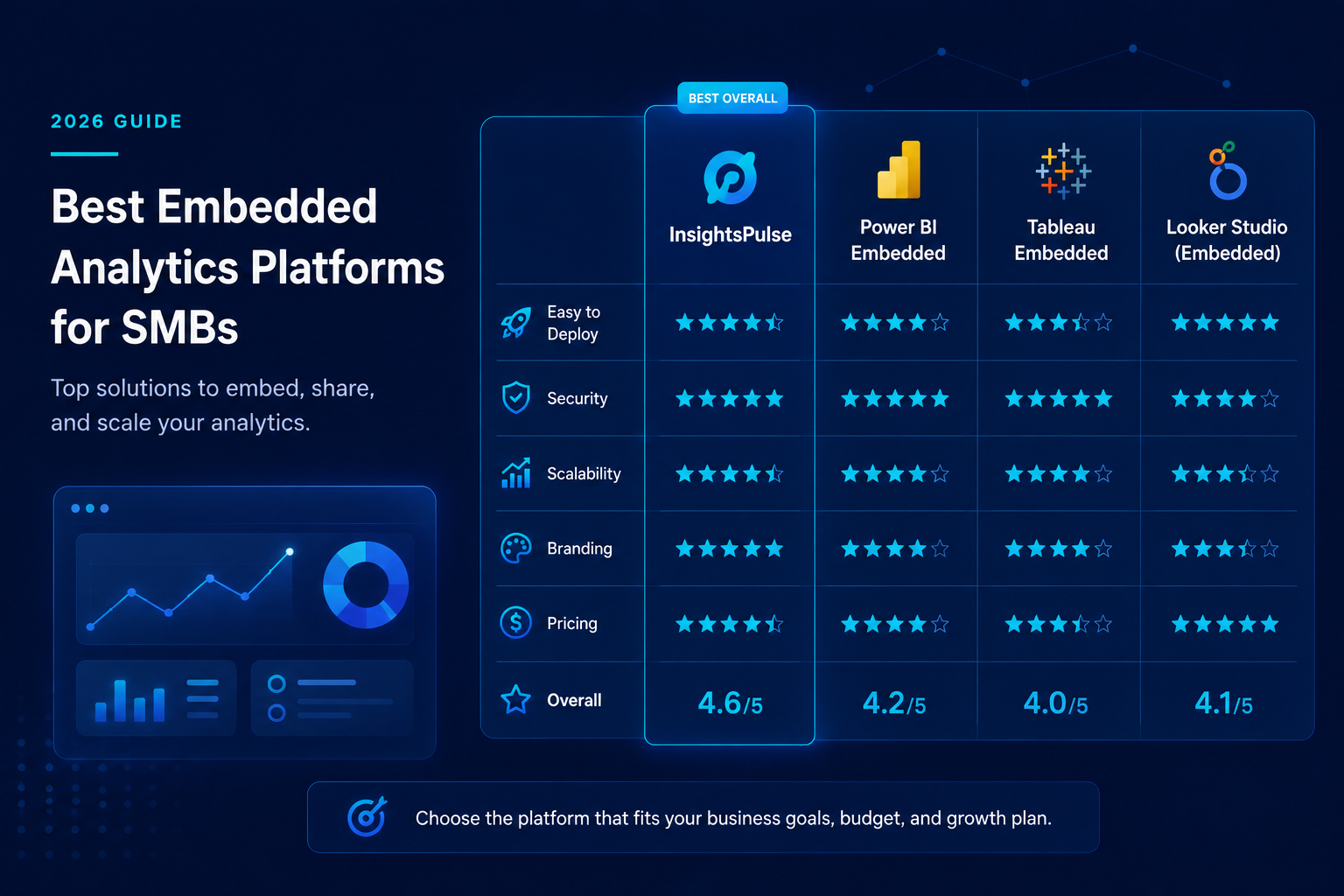
Best Embedded Analytics Platforms for SMBs in 2026
Data has become one of the most valuable assets for businesses. Whether you're running a SaaS company, digital marketing agency, consulting firm, healthcare practice, or manufacturing business, your customers expect instant access to meaningful insights.
Instead of sending static reports or spreadsheets, many organizations now use embedded analytics platforms to integrate interactive dashboards directly into their websites, customer portals, and applications.
However, with so many options available, choosing the right platform can be challenging—especially for small and medium-sized businesses (SMBs) that need enterprise-level features without enterprise-level complexity.
In this guide, we'll compare the best embedded analytics platforms for SMBs, their strengths, limitations, pricing considerations, and how to choose the right solution for your business.
What Is an Embedded Analytics Platform?
An embedded analytics platform allows businesses to integrate dashboards, reports, and visualizations into their own software, websites, or customer portals.
Instead of requiring users to log into separate BI tools, analytics become a seamless part of your product or service.
Typical capabilities include:
- Interactive dashboards
- Real-time reporting
- Secure user authentication
- White-label branding
- Role-based access control
- Data visualization
- Mobile-friendly reporting
Embedded analytics improves customer experience while making data more accessible and actionable.
Why SMBs Are Investing in Embedded Analytics
Small and medium-sized businesses are increasingly adopting embedded analytics because it helps them compete with larger organizations without building custom reporting systems from scratch.
Key benefits include:
- Better customer experience
- Faster decision-making
- Improved client retention
- Professional white-label reporting
- Reduced manual reporting
- Scalable analytics infrastructure
- Competitive differentiation
Whether you serve 50 customers or 50,000, embedded analytics helps deliver value through data.
Key Features to Look For
Before selecting a platform, evaluate these essential capabilities.
Easy Dashboard Embedding
Your platform should make it simple to embed dashboards into websites, portals, or SaaS applications with minimal development effort.
White-Label Branding
Customers should interact with your brand—not the analytics provider.
Look for support for:
- Custom logo
- Brand colors
- Custom domain
- Personalized login page
Security
Security should include:
- Role-based permissions
- Row-Level Security (RLS)
- Single Sign-On (SSO)
- Secure authentication
- Data encryption
- Audit logs
Scalability
Choose a platform that grows with your business without requiring a complete infrastructure overhaul.
Multi-Platform Support
Businesses often use different BI tools. A flexible platform should support:
- Power BI
- Tableau
- Google Data Studio (Looker Studio)
- HTML dashboards
- Custom web applications
Top Embedded Analytics Platforms for SMBs
1. InsightsPulse
Best for: SMBs looking for a ready-to-use, white-label analytics portal.
InsightsPulse is designed to help businesses securely share dashboards without the complexity of building their own embedded analytics infrastructure.
It supports multiple BI platforms, making it an excellent choice for agencies, SaaS providers, consultants, healthcare organizations, and enterprises.
Key Features
- Power BI support
- Tableau support
- Google Data Studio (Looker Studio) integration
- HTML dashboard integration
- White-label branding
- Secure user authentication
- Role-based permissions
- Centralized user management
- Mobile-friendly interface
- Embedded dashboard sharing
Pros
- Quick deployment
- Supports multiple BI platforms
- Professional client portal
- Reduced development effort
- Enterprise-grade security
- Ideal for growing businesses
Best For
Businesses that want to launch a branded analytics portal quickly without investing in custom development.
2. Microsoft Power BI Embedded
Best for: Microsoft-based businesses.
Power BI Embedded enables organizations to integrate dashboards into websites and applications using Azure.
Pros
- Strong Microsoft ecosystem integration
- Cost-effective for many external users
- Enterprise security
- Rich visualizations
- Large community support
Limitations
- Azure configuration can be complex
- Requires implementation expertise
- Capacity planning is important for cost optimization
3. Tableau Embedded Analytics
Best for: Advanced data visualization.
Tableau is widely recognized for its powerful analytics and interactive visualizations.
Pros
- Industry-leading visualizations
- Extensive customization
- Excellent exploratory analytics
- Enterprise scalability
Limitations
- Higher licensing costs
- Steeper learning curve
- More complex deployment for smaller teams
4. Google Data Studio (Looker Studio)
Best for: Budget-conscious businesses.
Looker Studio offers an accessible way to build dashboards using Google's ecosystem.
Pros
- Free to get started
- Easy Google integrations
- User-friendly interface
- Fast dashboard creation
Limitations
- Fewer advanced enterprise features
- Limited white-label capabilities
- Less suitable for large-scale customer portals
Comparison Table
Feature | InsightsPulse | Power BI Embedded | Tableau Embedded | Looker Studio |
|---|---|---|---|---|
White-Label Portal | ✅ | Partial | Partial | Limited |
Power BI Support | ✅ | ✅ | ❌ | ❌ |
Tableau Support | ✅ | ❌ | ✅ | ❌ |
Looker Studio Support | ✅ | ❌ | ❌ | ✅ |
HTML Dashboards | ✅ | Limited | Limited | No |
User Management | ✅ | Requires Development | Requires Development | Basic |
Secure Authentication | ✅ | ✅ | ✅ | Basic |
SMB Friendly | ⭐⭐⭐⭐⭐ | ⭐⭐⭐⭐ | ⭐⭐⭐ | ⭐⭐⭐⭐ |
How to Choose the Right Embedded Analytics Platform
When evaluating solutions, consider the following questions:
Do you need white-label branding?
If maintaining your own brand is important, choose a platform that allows full customization.
Which BI tools do you use?
Some businesses rely exclusively on Power BI, while others use Tableau, Looker Studio, or multiple platforms.
A solution supporting multiple analytics tools provides greater flexibility.
How many users will access dashboards?
If your customer base is growing, select a platform that scales efficiently while maintaining performance and security.
How much development effort can you invest?
Building embedded analytics from scratch requires technical expertise and ongoing maintenance.
Ready-to-use platforms significantly reduce implementation time and costs.
Why InsightsPulse Is an Excellent Choice for SMBs
Many SMBs need enterprise-level analytics without enterprise-level complexity.
InsightsPulse addresses this challenge by providing a comprehensive white-label analytics portal that enables businesses to:
- Share dashboards securely
- Support multiple BI platforms
- Deliver branded analytics experiences
- Manage users centrally
- Reduce Power BI licensing costs
- Launch quickly without custom development
- Scale as the business grows
Whether you're serving clients, partners, franchisees, or internal teams, InsightsPulse simplifies analytics delivery while maintaining a professional user experience.
Best Practices for Embedded Analytics
To maximize the success of your analytics platform:
- Keep dashboards focused on actionable KPIs.
- Optimize reports for fast loading.
- Implement role-based access controls.
- Regularly monitor user engagement.
- Ensure dashboards are mobile responsive.
- Maintain consistent branding across all reports.
- Periodically review user permissions and security settings.
These practices improve usability, increase adoption, and help users get more value from your analytics.
Choosing the right embedded analytics platform can significantly improve how your business delivers insights to customers, partners, and internal teams. While Power BI Embedded, Tableau Embedded, and Looker Studio each have their strengths, SMBs often need a solution that combines flexibility, security, and ease of deployment.
InsightsPulse stands out by bringing together support for Power BI, Tableau, Google Data Studio (Looker Studio), and HTML dashboards within a secure, fully white-label analytics portal. It eliminates the need for complex custom development while providing centralized user management, enterprise-grade security, and a seamless branded experience.
If you're looking to modernize dashboard sharing, reduce reporting overhead, and deliver a professional analytics experience, InsightsPulse offers a scalable solution built for growing businesses.
Ready to simplify embedded analytics? Explore how InsightsPulse can help your business securely share dashboards, delight customers, and scale analytics with confidence.